Introduction
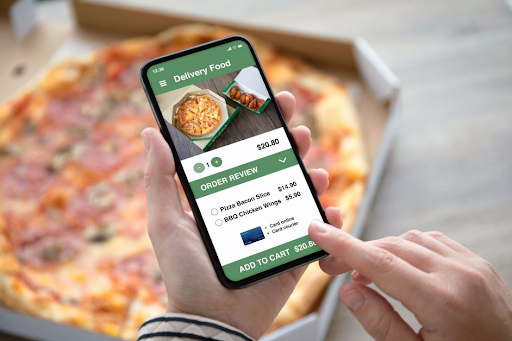
In today’s digital age, delivery apps are a fantastic way to expand your food trailer’s reach and attract new customers. But getting started can be a bit overwhelming. This guide will walk you through the process of signing up for delivery apps, including what you need, the costs involved, and how the whole system works.
Signing Up for Delivery Apps: Step-by-Step Guide
Here’s a detailed look at how to get started with delivery apps for your food trailer.
1. Choose the Right Delivery Apps for Your Food Trailer
- Popular Delivery Apps:
- Uber Eats: A global platform with a broad customer base.
- DoorDash: Known for its large delivery network and user-friendly app.
- Grubhub: Offers delivery and pick-up options with a wide reach.
- Postmates: Part of Uber Eats, focusing on quick deliveries.
- Seamless: A Grubhub platform specifically for New York City.
- Factors to Consider:
- Geographic Reach: Choose apps that are popular and widely used in your area.
- Fees and Commission Rates: Compare the costs of using each app.
- Customer Base: Look at the size of the app’s customer base in your location.
2. Prepare Your Food Trailer for Delivery
- Update Your Menu:
- What to Do: Create a digital menu with high-quality photos and descriptions of your dishes.
- Why It’s Important: An appealing menu attracts customers and helps them decide what to order.
- Set Up Delivery Packaging:
- What to Use: Invest in quality, eco-friendly packaging that keeps food fresh and presents well.
- Why It Matters: Good packaging ensures that food arrives in excellent condition and leaves a positive impression.
3. Sign Up for Delivery Apps
Each delivery app has its own sign-up process, but here’s a general overview:
- Online Application:
- How to Apply: Visit the delivery app’s website or download the app and follow the instructions for becoming a restaurant partner.
- What You’ll Need:
- Business Information: Business name, contact details, and business address.
- Menu Details: A digital version of your menu with pricing.
- Food Safety Certification: Proof of food safety certifications if required.
- Bank Account Information: For receiving payments.
- Account Setup:
- What Happens: You’ll fill out an application form with details about your food trailer and menu.
- Approval Process: The app’s team will review your application and may contact you for additional information or a site visit.
- Training:
- What to Expect: You may receive training on how to use the app’s platform, manage orders, and handle deliveries.
4. Understand the Costs Involved
Here’s a breakdown of typical costs for delivery apps:
- Commission Fees:
- What They Are: A percentage of each order’s total amount, typically ranging from 15% to 30%.
- Examples:
- Uber Eats: ~15% to 30% commission per order.
- DoorDash: ~15% to 30% commission per order.
- Grubhub: ~10% to 20% commission per order.
- Delivery Fees:
- What They Are: Sometimes, delivery apps charge a delivery fee to customers, which can vary.
- What You Pay: This is usually covered by the customer, but some apps allow you to set or negotiate delivery fees.
- Setup Fees:
- What They Are: Some apps might charge a one-time setup fee or monthly subscription fee.
- Examples:
- Uber Eats: Generally no setup fee, but a commission fee applies.
- DoorDash: Generally no setup fee, but a commission fee applies.
- Grubhub: May have a setup fee or monthly fee depending on the plan.
5. How the Delivery System Works
Understanding how the delivery app system functions will help you manage your orders efficiently:
- Order Placement:
- What Happens: Customers place orders through the app, selecting from your menu and paying online.
- How to Manage: You receive the order details via the app’s dashboard or tablet.
- Order Fulfillment:
- What to Do: Prepare the food according to the order details and package it for delivery.
- What to Expect: Delivery drivers (often called “couriers” or “delivery partners”) will pick up the food and deliver it to the customer.
- Payment Processing:
- How It Works: The app processes payments and transfers the funds to your bank account, minus the commission fees.
- Payment Schedule: Payments are usually made on a weekly or bi-weekly basis.
- Customer Feedback:
- What to Check: Customers can leave reviews and ratings for their experience.
- Why It’s Important: Reviews help you understand customer satisfaction and can influence future orders.
6. Promote Your Delivery Service
- Update Your Website and Social Media:
- What to Do: Add links to your delivery app profiles and promote special offers.
- Why It Works: Direct traffic to your delivery options and increase visibility.
- Run Delivery-Specific Promotions:
- What to Offer: Discounts or special deals for orders placed through the delivery apps.
- Why It Helps: Encourages more people to try your delivery service.
Final Thoughts
Getting started with delivery apps is a great way to expand your food trailer’s reach and attract more customers. By choosing the right apps, preparing your food trailer for delivery, understanding the costs, and effectively managing the delivery process, you can set yourself up for success.
Keep your customers satisfied with high-quality food and excellent service, and use promotions and feedback to continue growing your business. With the right approach, delivery apps can be a powerful tool for your food trailer’s success.